
Kubernetes RBAC explained: Roles, bindings and working examples
Learn how Kubernetes RBAC works with practical examples. Covers authorization modes, Roles, ClusterRoles, RoleBindings, working YAML, and kubectl auth can-i verification.
4 lessons · 10 min · Advanced
Written by

Marketing Team at Civo
Written by
Marketing Team at Civo
Role-Based Access Control (RBAC) is the mechanism Kubernetes uses to decide what authenticated users and service accounts are allowed to do. Once a request passes authentication (who are you?), RBAC handles authorisation (what are you allowed to do?).
This guide covers how RBAC works, the four core objects, and working examples you can apply to your own cluster.
Authorisation modes
Kubernetes supports several authorisation modes. In practice, almost all clusters use RBAC. The others are worth knowing about briefly:
The four RBAC objects
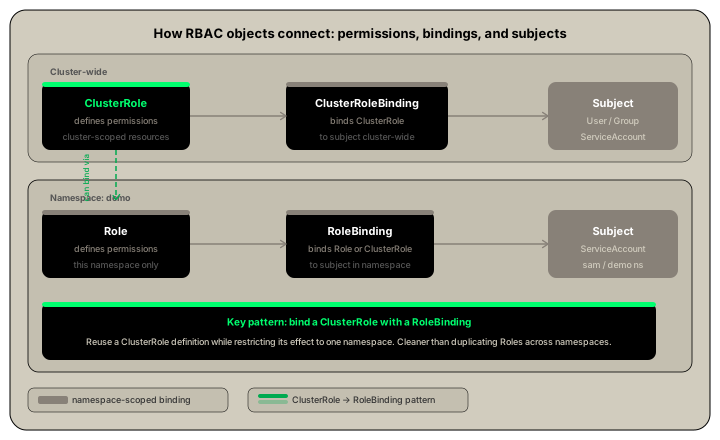
RBAC is built on four objects. Two define permissions, two bind those permissions to identities.
A subject can be a user, a group, or a service account.
One important pattern: you can bind a ClusterRole with a RoleBinding. This lets you define a reusable role at the cluster level but restrict its effect to a single namespace. This is cleaner than creating identical Roles in every namespace.
Working example: namespace access for a service account
This example creates a service account, grants it permissions on specific resources in a namespace, and verifies the access works.
Step 1: Create a namespace and service account
kubectl create namespace demokubectl create sa sam -n demokubectl get serviceaccount -n demo
Expected output:
NAME SECRETS AGEdefault 0 5ssam 0 2s
Step 2: Create a Role
apiVersion: rbac.authorization.k8s.io/v1kind: Rolemetadata:name: pod-readernamespace: demorules:- apiGroups: ["", "apps"]resources: ["pods", "deployments"]verbs: ["get", "list", "watch"]
kubectl apply -f role.yaml
Step 3: Create a RoleBinding
apiVersion: rbac.authorization.k8s.io/v1kind: RoleBindingmetadata:name: pod-reader-bindingnamespace: demosubjects:- kind: ServiceAccountname: samnamespace: demoroleRef:kind: Rolename: pod-readerapiGroup: rbac.authorization.k8s.io
kubectl apply -f rolebinding.yaml
Step 4: Verify with kubectl auth can-i
kubectl auth can-i get pods --as=system:serviceaccount:demo:sam -n demo
Expected output:
yes
kubectl auth can-i delete pods --as=system:serviceaccount:demo:sam -n demo
Expected output:
no
kubectl auth can-i get pods --as=system:serviceaccount:demo:sam -n default
Expected output:
no
The service account can read pods in the demo namespace but not delete them and not access any other namespace. This confirms the RoleBinding is scoped correctly.
Working example: ClusterRole and ClusterRoleBinding
Use a ClusterRole when you need permissions that span the whole cluster or apply to cluster-scoped resources.
kubectl create clusterrole cr --verb=get,list,watch,delete --resource=secrets,pods,deployments
Bind the ClusterRole to the service account using a RoleBinding (namespace-scoped) rather than a ClusterRoleBinding to limit its effect to the demo namespace:
kubectl create rolebinding super --serviceaccount=demo:sam -n demo --clusterrole=cr
Verify:
kubectl auth can-i get pods --as=system:serviceaccount:demo:sam -n demo
Expected output:
yes
kubectl auth can-i get pods --as=system:serviceaccount:demo:sam -n default
Expected output:
no
Common patterns
Read-only access to a namespace
Useful for monitoring agents, logging pipelines, and CI systems that need to inspect resources without modifying them:
apiVersion: rbac.authorization.k8s.io/v1kind: Rolemetadata:name: read-onlynamespace: productionrules:- apiGroups: ["", "apps"]resources: ["pods", "deployments", "services", "configmaps"]verbs: ["get", "list", "watch"]
CI/CD service account with deploy permissions
A service account that can create and update Deployments but cannot read Secrets:
apiVersion: rbac.authorization.k8s.io/v1kind: Rolemetadata:name: deployernamespace: productionrules:- apiGroups: ["apps"]resources: ["deployments"]verbs: ["get", "list", "create", "update", "patch"]- apiGroups: [""]resources: ["services", "configmaps"]verbs: ["get", "list", "create", "update", "patch"]
View-only ClusterRole for developer access
Kubernetes includes a built-in view ClusterRole you can bind to developers who need read access across all namespaces:
kubectl create clusterrolebinding developer-view \--clusterrole=view \--user=developer@example.com
List all permissions for a service account
kubectl auth can-i --list --as=system:serviceaccount:demo:sam -n demo
This outputs every verb and resource the service account is permitted to act on in the demo namespace.

Marketing Team at Civo
Civo is the Sovereign Cloud and AI platform designed to help developers and enterprises build without limits. We bridge the gap between the openness of the public cloud and the rigorous security of private environments, delivering full cloud parity across every deployment. As a team, we are dedicated to providing scalable compute, lightning-fast Kubernetes, and managed services that are ready in minutes. Through CivoStack Enterprise and our FlexCore appliance, we empower organizations to maintain total data sovereignty on their own hardware.
Our mission is to make the cloud faster, simpler, and fairer. By providing enterprise-grade NVIDIA GPUs and streamlined model management, we ensure that high-performance AI and machine learning are accessible to everyone. Built for transparency and performance, the Civo Team is here to give you total control over your infrastructure, your data, and your spend.
Share this lesson
Nice work, you finished Kubernetes Configuration and Security: ConfigMaps, secrets and access control.
Your next step is up to you - keep building on what you've learned, or put it into practice on Civo.
Next Course
Kubernetes Volumes: Persisting and sharing data in your cluster
5 lessons · 16 min
Learn how Kubernetes volumes work and which type to use. Covers emptyDir, hostPath, PersistentVolumes, PVCs, StorageClasses, dynamic provisioning, NFS, and local volumes.
Put it into practice
Spin up your first cluster on Civo
Get $250 free credit and launch a production-ready Kubernetes cluster in under 90 seconds.