
Kubernetes StatefulSets: Concept and working example
Learn how Kubernetes StatefulSets work, why they differ from Deployments, and how to create, scale and manage them with a working hands-on example.
9 lessons · 27 min · Intermediate
Written by

Marketing Team at Civo
Written by
Marketing Team at Civo
What are StatefulSets and why do they exist?
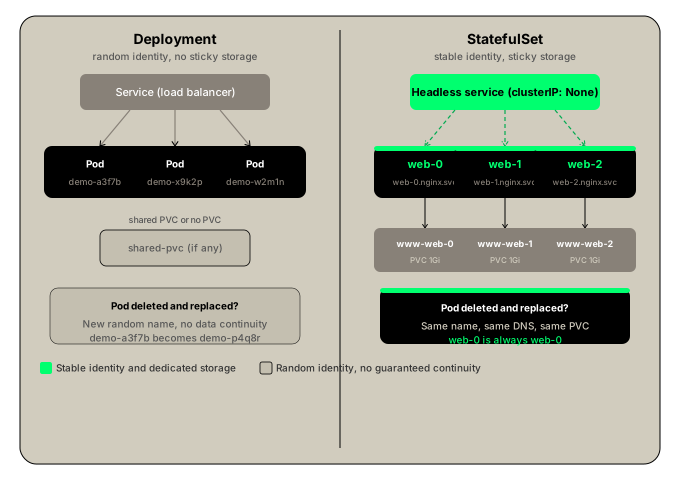
Deployments create pods with random names in any order. For stateless applications this is fine — any replica can serve any request. For stateful applications like databases this is a problem.
Consider a database Deployment with two replicas. The pods get names like demo-a3f7b and demo-x9k2p. They start in any order, they have no stable identity, and any service can route traffic to either of them. This works for serving read traffic but is dangerous for writes. Writing to any replica without coordination creates data inconsistency.
StatefulSets solve this by giving pods predictable, ordered names and creating them in sequence. If you name your StatefulSet web, the pods are named web-0, web-1, web-2. The next pod does not start until the previous one is ready. You can define web-0 as the primary and web-1, web-2 as replicas with confidence because the order is guaranteed.
StatefulSet vs Deployment
Why headless services?
A regular Service load-balances across all pods. For stateless applications this is exactly what you want. For a database it is dangerous — writes routed to a replica instead of the primary create inconsistency.
A headless Service sets clusterIP: None. Instead of a single virtual IP that load-balances, Kubernetes creates individual DNS entries for each pod:
web-0.nginx.default.svc.cluster.localweb-1.nginx.default.svc.cluster.localweb-2.nginx.default.svc.cluster.local
This lets you address specific pods directly by DNS name. Your application can always send writes to web-0.nginx.default.svc.cluster.local regardless of which node it is running on. The identity is stable.
Working example
This example creates a headless Service and a StatefulSet with three nginx replicas, each with its own PersistentVolumeClaim.
Prerequisites: install local-path-provisioner to provide a StorageClass for dynamic PVC provisioning. Check the latest release on GitHub and replace the version number:
kubectl apply -f https://raw.githubusercontent.com/rancher/local-path-provisioner/v0.0.26/deploy/local-path-storage.yaml
Verify the StorageClass exists:
kubectl get storageclass
Expected output:
NAME PROVISIONER RECLAIMPOLICY VOLUMEBINDINGMODElocal-path rancher.io/local-path Delete WaitForFirstConsumer
Create the headless Service and StatefulSet
apiVersion: v1kind: Servicemetadata:name: nginxlabels:app: nginxspec:clusterIP: Noneselector:app: nginxports:- port: 80name: web---apiVersion: apps/v1kind: StatefulSetmetadata:name: webspec:serviceName: nginxreplicas: 2selector:matchLabels:app: nginxtemplate:metadata:labels:app: nginxspec:containers:- name: nginximage: nginxports:- containerPort: 80name: webvolumeMounts:- name: wwwmountPath: /usr/share/nginx/htmlvolumeClaimTemplates:- metadata:name: wwwspec:accessModes: ["ReadWriteOnce"]storageClassName: local-pathresources:requests:storage: 1Gi
kubectl create -f statefulset.yaml
Watch the pods start in order:
kubectl get pods
Expected output — web-0 starts first and web-1 only starts once web-0 is Running:
NAME READY STATUS RESTARTS AGEweb-0 1/1 Running 0 30sweb-1 1/1 Running 0 15s
Check the StatefulSet:
kubectl get statefulset
Expected output:
NAME READY AGEweb 2/2 45s
Check the PVCs created automatically — one per pod:
kubectl get pvc
Expected output:
NAME STATUS VOLUME CAPACITY STORAGECLASSwww-web-0 Bound pvc-abc123... 1Gi local-pathwww-web-1 Bound pvc-def456... 1Gi local-path
Check the PVs created automatically by the provisioner:
kubectl get pv
Scale up to three replicas
kubectl scale --replicas=3 statefulset/web
Watch the new pod appear:
kubectl get pods
Expected output:
NAME READY STATUS RESTARTS AGEweb-0 1/1 Running 0 2mweb-1 1/1 Running 0 2mweb-2 1/1 Running 0 10s
A new PVC is created automatically for web-2:
kubectl get pvc
Access a pod by DNS name
Exec into web-0 and curl another pod directly using its stable DNS name:
kubectl exec -it web-0 -- bash
curl web-0.nginx.default.svc.cluster.local
Expected output (if an index.html exists in the volume):
Hello world!
You can also use the short form within the same namespace:
curl web-0.nginx
Exit the pod:
exit
Scale down to one replica
Scaling down happens in reverse order. web-2 is deleted first, then web-1:
kubectl scale --replicas=1 statefulset/web
kubectl get pods
Expected output once scaling completes:
NAME READY STATUS RESTARTS AGEweb-0 1/1 Running 0 5m
Check the PVCs:
kubectl get pvc
The PVCs for web-1 and web-2 are not deleted. This is intentional. If you scale back up, web-1 and web-2 will reconnect to the same PVCs and find their data intact. The sticky identity is preserved across scale-down and scale-up events.
To permanently remove the storage, delete the PVCs manually:
kubectl delete pvc www-web-1 www-web-2
What Kubernetes does and what you are responsible for
Kubernetes handles pod naming and ordering, sequential creation and deletion, PVC creation per pod via volumeClaimTemplates, and reattaching each pod to its original PVC when rescheduled.
You are responsible for:
- Choosing and installing a storage provisioner that suits your workload
- Implementing data replication between pods if needed. For databases like MySQL or MongoDB, you must configure the primary/replica replication yourself. StatefulSets give you predictable pod names and stable storage to build that configuration on top of, but they do not do replication for you.
- Defining a backup and recovery strategy for your data

Marketing Team at Civo
Civo is the Sovereign Cloud and AI platform designed to help developers and enterprises build without limits. We bridge the gap between the openness of the public cloud and the rigorous security of private environments, delivering full cloud parity across every deployment. As a team, we are dedicated to providing scalable compute, lightning-fast Kubernetes, and managed services that are ready in minutes. Through CivoStack Enterprise and our FlexCore appliance, we empower organizations to maintain total data sovereignty on their own hardware.
Our mission is to make the cloud faster, simpler, and fairer. By providing enterprise-grade NVIDIA GPUs and streamlined model management, we ensure that high-performance AI and machine learning are accessible to everyone. Built for transparency and performance, the Civo Team is here to give you total control over your infrastructure, your data, and your spend.
Share this lesson